
Gute Einführung ins Thema von Mozilla Developper Network
Always if you have severe troubles with Selenium, you can reach your test-automation goal with JavaScript (JavascriptExecutor). To use your XPaths for locating an element, your choice is document.evaluate(). The handling of this function is somewhat nasty.
Evaluate() returns the XPathResult-object. The evaluate()-method has five parameters, but concentrate on the first and fourth parameter and treat the rest as fixed. Here’s an example:
let myXPathResult = document.evaluate( 'count(//div)', document, null, XPathResult.ANY_TYPE, null);
If you choose the generic XPathResult.ANY_TYPE, the XPath-expression: count(//div) itself determines the return type. So in this example the return type is XPathResult.NUMBER_TYPE
The return type is important for the further processing of the value.
String auslesen
If you like to return the string-value of a nodeset, then you need to choose XPathResult.STRING_TYPE:
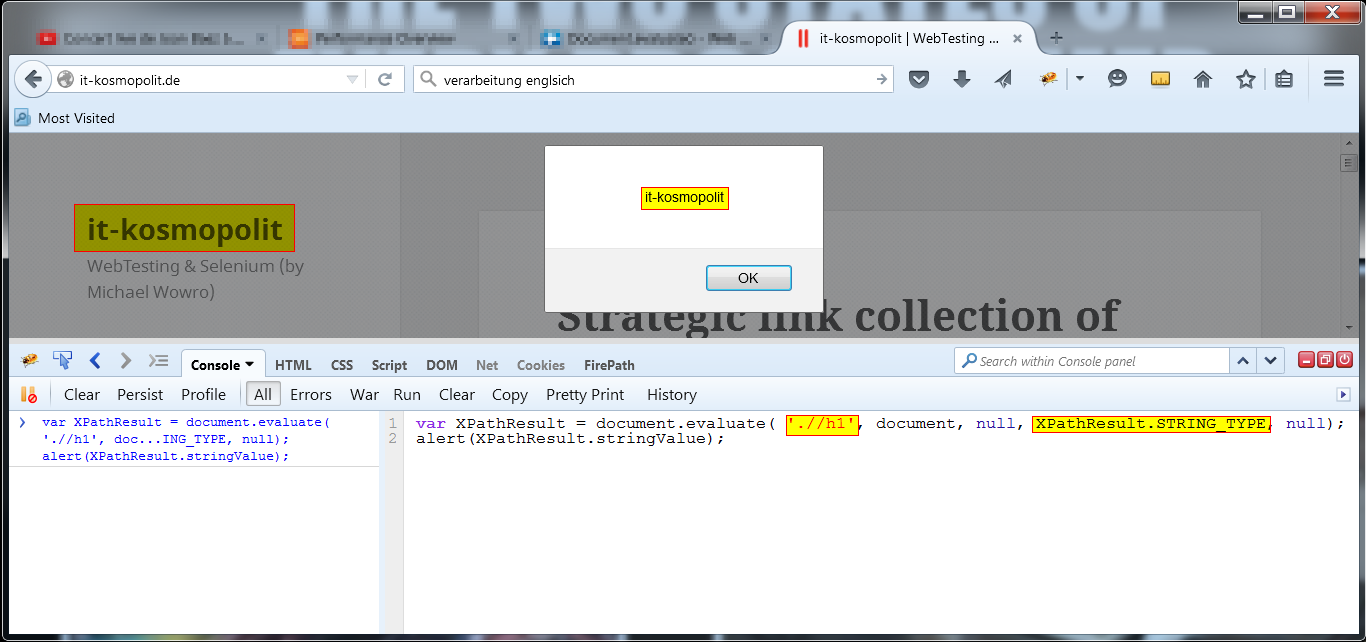
Go to www.it-kosmopolit.de and press F12 to open developer tools. In the Console enter:
var myXPathResult = document.evaluate( './/h1', document, null, XPathResult.STRING_TYPE, null);
alert(myXPathResult.stringValue);
Elemente zählen
If you want to process with the result of counting the div’s, you execute this JavaScript:
let xpathOfElementsToCount = '//div';
let countStatement = 'count(' + xpathOfElementsToCount + ')';
let numberOfelements = document.evaluate( countStatement, document, null, XPathResult.ANY_TYPE, null).numberValue;
alert(numberOfelements);

Unfortunately this function is not implemented in Internet Explorer until now.
Getting back an element-node
Alternative 1
let xpath = ".//a[@class='myClass']";
let myNodeSet = document.evaluate(xpath, document, null, XPathResult.FIRST_ORDERED_NODE_TYPE, null).singleNodeValue;
myNodeSet.remove() // entfernt das Element
Note: .singleNodeValue only works with returnType ANY_UNORDERED_NODE_TYPE or FIRST_ORDERED_NODE_TYPE (XPathResult.singleNodeValue – Web APIs | MDN (mozilla.org))
Alternative 2
To be done
Allgemeines zu XPathResult
Snapshots also return element nodesets, but they freeze the state of the nodeset at the moment of call.