
Archiv der Kategorie: Testautomatisierung

Use .NET libraries in Robot Framework

With Robot Framework on IronPython (Install Robot Framework with IronPython on Windows) you still implement the keywords in Python, but you can seamlessly access the wealth of .NET-libraries.
An example is worth a thousand words; so find an example how to use System.IO.File from .NET to create a file:
1.) IronPython (Python on .NET) file:

import System
class FileManager:
    def create_file(self, fileName):
        System.IO.File.Create(fileName)

… save as C:\Program Files (x86)\robotframework-2.9\src\bin\FileManager.py
2.) Robot Framework file:

*** Settings ***
Library    FileManager
*** Test Cases ***
My Test
    Create File    fantastic.txt

… save as C:\Program Files (x86)\robotframework-2.9\src\bin\ExampleTestCase.txt
The Keyword „Create File“ in this .txt is automaically matched to the create_file method from the Python file. The underscore is automatically „translated“ to a space.
3.) Execute in cmd:

cd C:\Program Files (x86)\robotframework-2.9\src\bin
ipybot ExampleTestCase.txt

Finished! Find fantactic.txt in C:\Program Files (x86)\robotframework-2.9\src\bin.
For more information on Robot Framework read: https://it-kosmopolit.de/strategic-link-collection-of-robot-framework/

Install Robot Framework with IronPython on Windows

… or how to get YOUR Robot Framework test-report in less than 10 minutes!

Notes

Installation architecture

ironPython-robot-framework-architecture

Install Robot Framework from Source Code

1.) Download & install IronPython http://ironpython.net/download/
2.) Install elementtree (because it’s broken in current IronPython: https://github.com/IronLanguages/main/issues/968):

cd C:\Program Files (x86)\IronPython 2.7
ipy setup.py install

3.) Install Robot Framework:

cd "C:\Program Files (x86)\robotframework-2.9"
"C:\Program Files (x86)\IronPython 2.7\ipy.exe" setup.py install

4.) Add

C:\Program Files (x86)\IronPython 2.7;

to the PATH-variable.
5.) Restart cmd & check for success:
cd "C:\Program Files (x86)\robotframework-2.9\src\bin"
ipybot --version

ironpython-robot-framework-version

Run an example testcase

1.) Save

*** Test Cases ***
My Test
Should Be Equal 1 1

as Example.txt in C:\Program Files (x86)\robotframework-2.9\src\bin
2.) Execute in cmd:
ipybot Example.txt

Create a test-report

1.) Execute in cmd:
ipyrebot output.xml
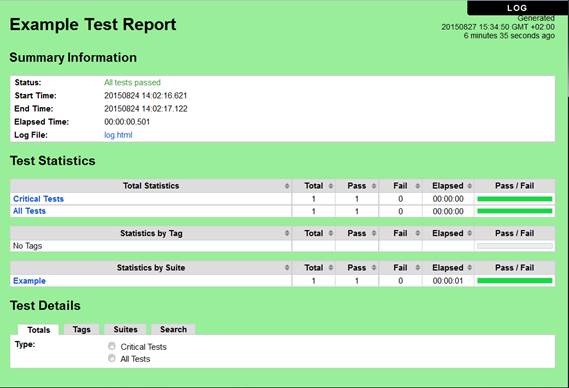
2.) Open report.html and enjoy the result:
robot-framework-ironpython-success
For more information on Robot Framework read: https://it-kosmopolit.de/strategic-link-collection-of-robot-framework/
Blog über Testautomatisierung und Softwaretest

Mir ist ein neuer Blog über Themen rund um Qualitätssicherung und Softwaretest sehr positiv aufgefallen. Im Schwerpunkt steht die Testautomatisierung, unter anderem mit Artikeln über Selenium und anderen Werkzeugen der Testautomatisierung.
I found a new German Blog with topics about Quality Assurance and Software Testing and the blog looks really good. Main focus on Test Automation, with posts about Selenium and other tools for test automation.